
Reviewed: August 2026.
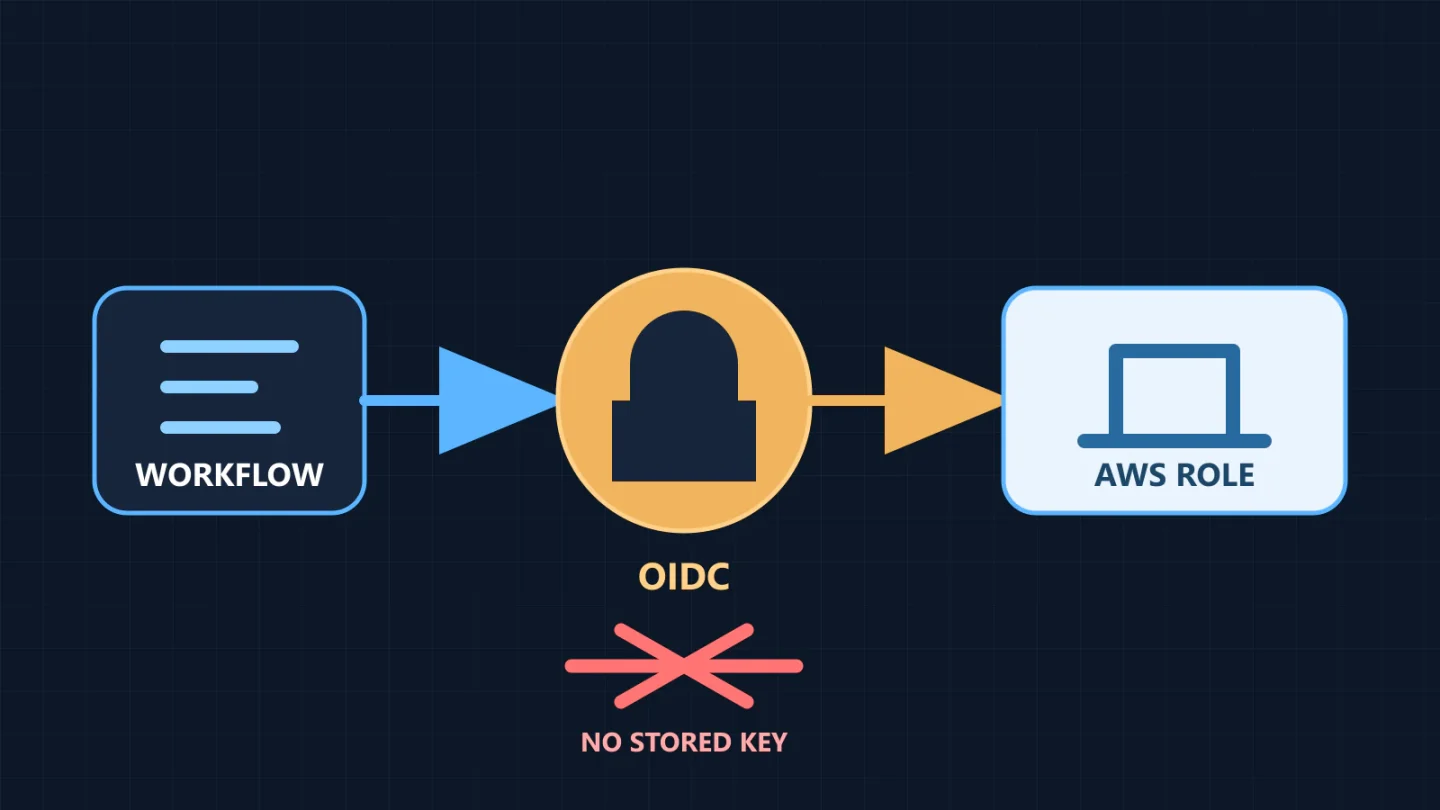
A GitHub Actions workflow does not need a long-lived AWS access key. With OpenID Connect (OIDC), a workflow requests a short-lived, signed identity token from GitHub. AWS Security Token Service verifies that token against an IAM trust policy and, only when its claims match, returns temporary role credentials. Nothing durable needs to be copied into a repository secret.
OIDC removes one credential-storage problem, but it does not make a deployment safe by itself. The trust policy must identify the intended repository and deployment context, the role permissions must be narrow, and GitHub environment protections must control which revisions reach the job that can request production credentials.
What changes when OIDC replaces access keys
With stored access keys, GitHub holds an AWS access key ID and secret access key that remain valid until someone rotates or disables them. A leak may therefore outlive the workflow run that exposed it. With OIDC, the workflow receives a GitHub-signed token for the current job, exchanges it for temporary AWS role credentials, and loses those credentials when the session expires.
The trust relationship is inverted. AWS does not trust a secret value stored in GitHub; it trusts GitHub’s OIDC issuer and evaluates token claims such as audience and subject. The subject can bind access to one repository and one branch, tag, pull-request context, or GitHub environment. AWS then evaluates the role’s normal permission policies for every deployment API call.
There are still two independent questions:
- Who may assume the role? The role trust policy answers this with OIDC claims.
- What may that role do? Identity policies, resource policies, organization controls, and permission boundaries answer this.
Do not combine them mentally. A perfectly restricted repository subject is still dangerous if the role is an administrator. A least-privilege role is still exposed if its subject matches every repository in an organization.
The request path
- A protected GitHub Actions job starts.
- The workflow has
id-token: write, which permits it to request an OIDC token. That permission does not itself grant AWS access. - The official AWS credentials action requests a token with the AWS audience.
- The action calls
sts:AssumeRoleWithWebIdentityfor the configured IAM role. - IAM verifies issuer, signature, time bounds, audience, subject, and the role’s trust conditions.
- STS returns temporary credentials for the role session.
- The AWS CLI or SDK uses those credentials, subject to the deployment role’s permission policy.
- AWS CloudTrail records the role-session activity for investigation and audit.
This is federation, not secret retrieval. If a workflow still reads AWS_ACCESS_KEY_ID and AWS_SECRET_ACCESS_KEY from GitHub secrets, it has not completed the migration.
Prerequisites and boundaries
Before creating the role, decide:
- the AWS account and Region for each environment;
- the exact GitHub repository that may deploy;
- whether the subject will be a protected environment, branch, or tag;
- which immutable artifacts the workflow will deploy;
- the minimum AWS API actions and resources required;
- who may approve the GitHub production environment;
- how the role will be disabled quickly if the workflow is compromised.
Create separate roles for development, staging, and production. Prefer separate AWS accounts as the isolation requirement grows. A single role with conditional logic for every environment is harder to reason about and gives a compromised development path more opportunity to reach production.
The account bootstrap that creates the OIDC provider and role is a privileged action. Keep it outside the deployment role. Bluegrass Cloud’s cloud security and governance work can help align this trust boundary with account structure, identity ownership, and change control.
Step 1: register GitHub as an IAM OIDC provider
In each AWS account that will trust GitHub, create an IAM OIDC identity provider with:
- Provider URL:
https://token.actions.githubusercontent.com - Audience:
sts.amazonaws.comwhen using the official AWS credentials action in the standard AWS partition
Use the current IAM console or reviewed infrastructure as code and follow AWS and GitHub’s current documentation. Do not copy an old certificate thumbprint from a blog post. Provider configuration and partition-specific audiences can change, so verify the official guidance during implementation.
Register the provider once per AWS account. Multiple deployment roles can trust the same provider with different subject conditions.
Step 2: write a trust policy that matches the actual subject
The following trust policy binds the role to the production GitHub environment. Replace the account, owner, repository, and immutable numeric IDs. GitHub repositories created after July 15, 2026 use an immutable default subject format containing owner and repository IDs; older repositories retain the previous name-only format unless they opt in. Repository renames or transfers after that date also move to the immutable format. Inspect the repository’s actual claim format before applying the policy.
{
  "Version": "2012-10-17",
  "Statement": [
    {
      "Sid": "GitHubProductionEnvironment",
      "Effect": "Allow",
      "Principal": {
        "Federated": "arn:aws:iam::123456789012:oidc-provider/token.actions.githubusercontent.com"
      },
      "Action": "sts:AssumeRoleWithWebIdentity",
      "Condition": {
        "StringEquals": {
          "token.actions.githubusercontent.com:aud": "sts.amazonaws.com",
          "token.actions.githubusercontent.com:sub": "repo:YOUR_ORG@OWNER_ID/YOUR_REPO@REPOSITORY_ID:environment:production"
        }
      }
    }
  ]
}
For a legacy repository that has not enabled immutable subjects, the environment subject is repo:YOUR_ORG/YOUR_REPO:environment:production. Do not guess which form applies. GitHub’s OIDC reference documents the current formats and provides a claim-debugging approach. Review the token claims in a nonproduction role before granting deployment permission.
Use StringEquals for an exact production subject. A broad condition such as repo:YOUR_ORG/* allows every matching repository to request the role. A condition that matches repo:YOUR_ORG/YOUR_REPO:* includes branches, tags, pull-request contexts, and environments from that repository. That may be intentional for a read-only role, but it is usually too broad for production deployment.
When a job references an environment, the subject uses the environment form rather than the branch form. You cannot require a branch-shaped subject and an environment-shaped subject in the same default sub value. Put branch and tag restrictions in the GitHub environment protection rules, or adopt a deliberately customized OIDC subject after testing the resulting claims.
Step 3: give the role only deployment permissions
There is no universal “deployer” policy. A CloudFormation deployment, container release, Lambda update, and static artifact upload require different actions. Start from the commands the workflow actually runs, scope resources, validate the policy, and test in a nonproduction account.
This illustrative policy can upload commit-addressed build artifacts only beneath one repository prefix. It cannot list every bucket, delete objects, change bucket policy, or deploy infrastructure. It does not itself prevent an existing object key from being overwritten; enforce write-once behavior separately when the release model requires it.
{
  "Version": "2012-10-17",
  "Statement": [
    {
      "Sid": "ListArtifactPrefix",
      "Effect": "Allow",
      "Action": "s3:ListBucket",
      "Resource": "arn:aws:s3:::YOUR_ARTIFACT_BUCKET",
      "Condition": {
        "StringLike": {
          "s3:prefix": "releases/YOUR_REPO/*"
        }
      }
    },
    {
      "Sid": "WriteImmutableArtifacts",
      "Effect": "Allow",
      "Action": [
        "s3:GetObject",
        "s3:PutObject"
      ],
      "Resource": "arn:aws:s3:::YOUR_ARTIFACT_BUCKET/releases/YOUR_REPO/*"
    }
  ]
}
The bucket should separately enforce encryption, public-access blocking, retention, and any requirement that a key cannot be overwritten. If the deployment needs KMS encryption, add only the needed KMS actions for the exact key and align its key policy. If the workflow assumes another role or passes a service role, treat sts:AssumeRole and iam:PassRole as privilege boundaries, not convenient catch-all permissions.
Run IAM Access Analyzer policy validation. After a representative test period, compare granted permissions with CloudTrail activity and remove unused actions. A successful deployment proves that enough access exists; it does not prove least privilege.
Step 4: protect the GitHub environment
Create a GitHub environment named exactly production, because that name becomes part of the OIDC subject. Configure deployment branches or tags so untrusted refs cannot target it. Where the GitHub plan and repository visibility support the required rules, require reviewers and prevent self-review or bypass according to the organization’s policy.
Environment approval is upstream of credential issuance: a job referencing the environment must satisfy its protection rules before it runs. This makes the environment a meaningful release boundary. It also keeps environment-scoped secrets and variables unavailable until the job is authorized.
Review who can edit workflow files, environment rules, repository Actions settings, and required reviewers. Anyone who can weaken the gate or merge arbitrary workflow code into the protected ref may be able to use the deployment role.
Step 5: request temporary credentials in the workflow
This workflow builds on a push to main, enters the protected production environment, requests OIDC credentials, verifies the assumed identity, and uploads one commit-addressed artifact path. Replace placeholders and build commands. The checkout action is pinned to the full commit behind its verified v6 release tag, and the AWS credentials action is pinned to the full commit used in GitHub’s official AWS OIDC guide, both reviewed in August 2026. Recheck those pins during routine dependency updates. Pin every additional action to a reviewed full commit SHA under your organization’s supply-chain policy as well.
name: Deploy production artifact

on:
  push:
    branches: [main]
  workflow_dispatch:

permissions:
  contents: read
  id-token: write

concurrency:
  group: production-deploy
  cancel-in-progress: false

jobs:
  deploy:
    runs-on: ubuntu-latest
    environment: production
    timeout-minutes: 20
    env:
      AWS_REGION: us-east-1
      ARTIFACT_BUCKET: YOUR_ARTIFACT_BUCKET

    steps:
      - name: Check out the reviewed revision
        uses: actions/checkout@d23441a48e516b6c34aea4fa41551a30e30af803 # v6

      - name: Build and test
        run: |
          npm ci
          npm test
          npm run build
          zip -r app.zip dist

      - name: Assume the production deployment role
        uses: aws-actions/configure-aws-credentials@e3dd6a429d7300a6a4c196c26e071d42e0343502
        with:
          role-to-assume: arn:aws:iam::123456789012:role/github-production-artifact-writer
          role-session-name: github-${{ github.run_id }}
          aws-region: ${{ env.AWS_REGION }}

      - name: Confirm the caller
        run: aws sts get-caller-identity

      - name: Upload the commit-addressed artifact
        run: >-
          aws s3 cp app.zip
          s3://${{ env.ARTIFACT_BUCKET }}/releases/YOUR_REPO/${{ github.sha }}/app.zip
          --no-progress
id-token: write is scoped to the workflow or job but does not give write access to repository contents or AWS. The OIDC token becomes useful only when an external trust policy accepts its claims. Keep all other GitHub permissions explicitly minimal because specifying a permissions block changes the defaults.
The example uses the commit SHA in the object key so each release path is tied to a specific revision. The key is not automatically write-once: a later PutObject can replace it unless the bucket configuration and upload design reject overwrites. A real deployment should also produce a checksum or signed provenance according to the organization’s supply-chain requirements and promote the same tested artifact rather than rebuilding differently for production.
Environment strategy and role design
| Environment | Recommended subject | Typical role boundary |
|---|---|---|
| Development | Dedicated development environment or exact development branch |
Development account and resources only |
| Staging | Protected staging environment |
Staging account; production explicitly absent |
| Production | Protected production environment with exact subject |
Specific production deployment operations and resources |
Use one role per deployment purpose when blast radius differs. An artifact publisher does not need to update Lambda. An infrastructure-plan job does not need apply permission. A CloudFormation execution role should be separate from the GitHub federation role when that separation improves review and limits what the workflow can pass.
Set role session duration to the shortest practical deployment window. Long builds should occur before the privileged job or before credential exchange. Avoid requesting production credentials and then spending an hour compiling.
Common failures and what they mean
Not authorized to perform sts:AssumeRoleWithWebIdentity: compare the actualaudandsubclaims with the trust policy. Environment subjects, immutable ID subjects, branch subjects, and customized subjects are different strings.- Credentials work from an unexpected ref: the trust subject or environment deployment rules are broader than intended.
- OIDC token cannot be requested: the job lacks
id-token: write, or organizational Actions policy blocks the action. - Role is assumed but deployment fails: federation worked; inspect the role’s permission policy, target resource policy, KMS policy, organization controls, Region, and request parameters.
- Repository rename breaks or changes trust: verify whether the repository moved to GitHub’s immutable subject format and update policy through controlled infrastructure changes.
- Pull-request workflow reaches AWS: never run privileged deployment logic on untrusted pull-request code, especially through risky
pull_request_targetpatterns that check out attacker-controlled content.
Security checks before removing the old keys
- Test OIDC in a nonproduction role with a harmless read-only call.
- Confirm the exact token subject, including immutable IDs where applicable.
- Verify that the approved branch or environment succeeds.
- Verify that another repository, branch, pull request, and environment fail to assume the role.
- Review role policies, resource policies, permission boundaries, and organization controls.
- Confirm CloudTrail shows the expected role session name and deployment calls.
- Rotate and remove repository or organization secrets containing the old access keys.
- Disable the old IAM access keys, monitor the next deployment, then delete them under the normal change process.
Search workflow history and repository content for accidental credential exposure, but do not print tokens or decoded credentials to logs. Masking is a last line of defense, not permission to log sensitive values.
Operational controls after launch
Alert on unexpected role assumptions, unusual Regions, denied API spikes, and deployment actions outside normal repositories or schedules. Include the GitHub run ID in the role session name so investigators can connect CloudTrail events to a workflow run. Retain deployment records and artifact digests.
Periodically review action pins, GitHub OIDC claim behavior, IAM trust policies, role usage, and environment reviewers. Repository transfers, renames, workflow consolidation, and account changes can alter the trust design. Treat those as access changes.
The emergency stop is simple: update or disable the production role trust policy, apply an explicit deny at the appropriate layer, or disable the workflow under the organization’s incident procedure. Test that responders know which control to use.
Recommended deployment pattern
For most teams, the sound baseline is one IAM OIDC provider per AWS account, exact role subjects for protected GitHub environments, separate roles and accounts by environment, full-SHA action pins, short sessions, immutable artifacts, narrow deployment permissions, and CloudTrail correlation. OIDC is then one part of a reviewed delivery system rather than a credential trick.
If your team is designing the larger delivery path, Bluegrass Cloud’s cloud modernization and migration work can incorporate environment separation, rollback, testing, and handoff. For a focused review, contact Bluegrass Cloud about the repository, AWS accounts, and deployment targets.