
Reviewed: August 2026.
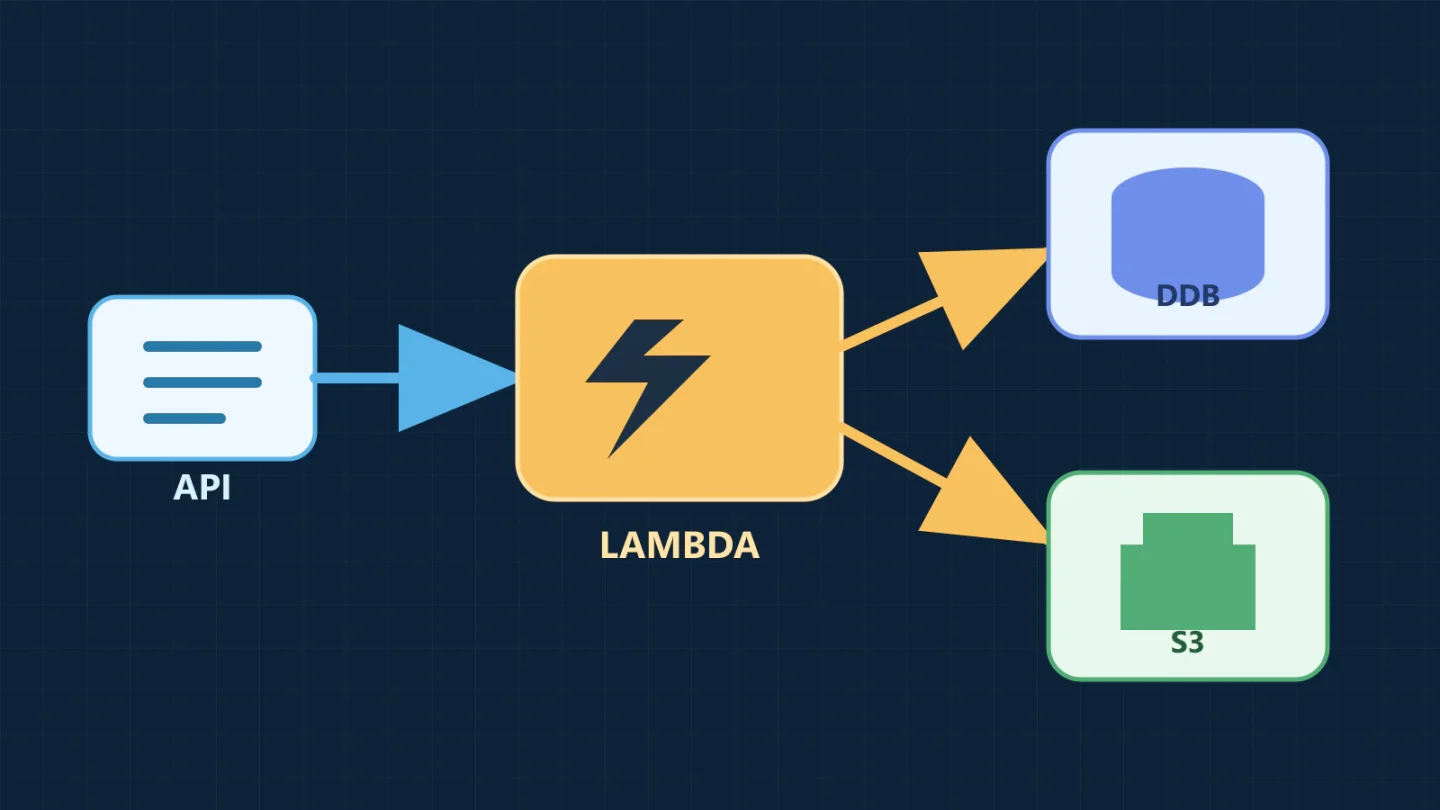
API Gateway, Lambda, DynamoDB, and S3 form a useful serverless application core, but the four service icons are not an architecture by themselves. The design becomes credible only after it defines the request contract, identity boundary, data access patterns, object-upload path, retry behavior, failure destinations, observability, and cost controls.
This guide uses a document-ingestion API as a concrete example. Clients create a document record, upload the object directly to S3 through a short-lived presigned URL, and read processing status through an API. The pattern avoids routing large files through Lambda while keeping authorization and metadata in the application layer.
The reference architecture
- A web or mobile client authenticates with the selected identity provider.
- The client calls an API Gateway route with its access token.
- API Gateway validates the request through an appropriate authorizer and invokes a Lambda function.
- Lambda validates application input and authorization context, then writes document metadata and status to DynamoDB.
- Lambda asks S3 for a short-lived presigned upload URL for a specific object key and returns it to the client.
- The client uploads the file directly to S3 with the required content type and integrity controls.
- An S3 event is delivered through an asynchronous boundary, commonly SQS for production workloads, to a processing Lambda function.
- The processor validates and transforms the object, then updates status in DynamoDB. Failed messages move to a dead-letter queue after the configured receive count.
- The client reads status through API Gateway. CloudWatch metrics, structured logs, traces, and alarms cover the complete request path.
API Gateway is the public contract, Lambda contains stateless orchestration and business logic, DynamoDB stores queryable operational state, and S3 stores the object. Keeping those responsibilities distinct makes scaling and failure behavior easier to reason about.
This pattern can support a new application or a stage in cloud modernization and migration, but it should be selected from workload requirements rather than used as a default replacement for every existing system.
Choose the API Gateway product deliberately
API Gateway offers HTTP APIs and REST APIs. Both can front Lambda, but their feature sets differ. AWS currently positions HTTP APIs as the lower-feature, lower-price option and REST APIs for needs such as API keys, per-client usage throttling, request validation, AWS WAF integration, or private API endpoints. Confirm the current service comparison before implementation.
For a straightforward JSON API using JWT authorization, an HTTP API may be sufficient. If the application needs REST API features such as usage plans, request validation at the gateway, caching, or WAF integration in that product path, use a REST API. “REST” in the business requirement does not automatically mean the API Gateway REST API product.
Whichever product you select, define:
- an OpenAPI or equivalent contract with explicit request and response schemas;
- authentication and authorization behavior for every route;
- payload limits and timeouts;
- CORS origins, methods, and headers rather than a reflexive wildcard;
- rate and burst targets plus the client response to
429; - consistent error bodies that do not expose stack traces;
- access logs with request and correlation identifiers.
API Gateway throttling is best-effort protection, not a billing cap or an exact security boundary. Clients should use bounded exponential backoff with jitter for retryable responses. Application limits, AWS Budgets, service quotas, and downstream concurrency controls still matter.
Keep Lambda functions small, stateless, and idempotent
A Lambda execution environment may be reused, but the application cannot rely on one invocation reaching the same environment as another. Initialize SDK clients outside the handler to benefit from reuse, and keep durable state in DynamoDB, S3, or another managed service. Do not cache user-sensitive state across invocations.
Functions should have one operational reason to change. The API function that creates an upload should not also parse every file type, send notifications, and reconcile failures. Separate synchronous request work from asynchronous processing so a slow document does not consume the API latency budget.
Design handlers for duplicate delivery. AWS recommends idempotent Lambda code because retries and at-least-once event delivery can present the same event more than once. Use a client-supplied idempotency key or a stable event identifier, a conditional DynamoDB write, and a target operation that returns the original result for a duplicate request.
Set memory, timeout, reserved concurrency, and ephemeral storage from load tests. Reserved concurrency can protect both the function and a downstream dependency. It can also create throttling, so alarm on it and model the queue or client behavior when the limit is reached.
Design DynamoDB from access patterns
DynamoDB does not reward a normalized relational model copied table-for-table. List the reads and writes the application must support, their expected rates, consistency needs, and required sort order. Then design the primary key and indexes.
For the example, one simple item could use:
pk = TENANT#<tenant-id>sk = DOCUMENT#<document-id>status,object_key,content_type,created_at, and version fields
A secondary index may support “documents for this tenant by status and time,” but add it only for a defined query. Avoid scans in a request path. Use condition expressions for create-if-absent, compare-and-set transitions, and optimistic concurrency. Decide whether each read can be eventually consistent.
Partition-key distribution matters. AWS warns that low-cardinality or heavily skewed keys can create hot partitions. If one tenant will dominate traffic, a tenant-only partition key may need write sharding or a different access pattern. Test realistic skew, not only total request count.
On-demand capacity is a sensible starting point for uncertain or variable traffic because it removes manual capacity provisioning, but it does not remove scaling behavior or quotas. AWS documents how new peaks are accommodated and when abrupt growth beyond the previous peak can throttle. For predictable steady workloads, compare provisioned capacity with auto scaling. Enable point-in-time recovery when the recovery requirement calls for it, and set maximum on-demand throughput when bounding runaway consumption is useful.
Use S3 for objects, not DynamoDB items
Store file content in S3 and keep metadata, ownership, status, and the object key in DynamoDB. Do not make the bucket public. Block public access, require TLS, encrypt objects under the selected ownership model, and restrict the application role to its prefixes and operations.
Presigned URLs let a client upload or download a specific object without receiving AWS credentials. The URL uses the permissions of the IAM principal that created it and remains usable until it expires, subject to the underlying credentials and policy. It is a bearer capability, so keep its lifetime short, log creation rather than the full URL, and do not put it in analytics or support tickets.
Use an application-generated object key, not a raw user filename. A direct upload should bind expected content type, length strategy, checksum, owner, and expiration. Be aware that uploading to an existing key can replace the object. Choose unique, non-guessable keys and, where replacement is not allowed, enforce versioning or write-once behavior through the upload design.
For untrusted uploads, a completed S3 write is not proof that the object is safe. Treat the object as quarantined until type validation, malware scanning where required, and business processing succeed. Use separate prefixes or buckets and explicit status transitions so consumers cannot read an unvalidated object.
A minimal presigned-upload starting point
The following illustrative Python example assumes API Gateway has already validated a JWT and supplied its claims. It creates a pending metadata record and a five-minute S3 upload URL. It uses no embedded credentials; the Lambda execution role supplies temporary credentials. The example deliberately covers only the narrow request path shown here and is not production-complete. Adapt the event shape to the exact API Gateway payload version and authorizer.
import base64
import json
import os
import re
import uuid
from datetime import datetime, timezone

import boto3

TABLE_NAME = os.environ["TABLE_NAME"]
UPLOAD_BUCKET = os.environ["UPLOAD_BUCKET"]
ALLOWED_TYPES = {"application/pdf", "text/plain"}
SAFE_NAME = re.compile(r"[^A-Za-z0-9._-]+")

dynamodb = boto3.client("dynamodb")
s3 = boto3.client("s3")


def response(status_code, body):
    return {
        "statusCode": status_code,
        "headers": {"content-type": "application/json"},
        "body": json.dumps(body),
    }


def lambda_handler(event, _context):
    claims = event["requestContext"]["authorizer"]["jwt"]["claims"]
    tenant_id = claims["tenant_id"]
    user_id = claims["sub"]

    raw_body = event.get("body") or "{}"
    if event.get("isBase64Encoded"):
        raw_body = base64.b64decode(raw_body).decode("utf-8")
    body = json.loads(raw_body)

    content_type = body.get("content_type")
    original_name = body.get("filename", "upload")
    if content_type not in ALLOWED_TYPES:
        return response(400, {"error": "unsupported_content_type"})

    document_id = str(uuid.uuid4())
    safe_name = SAFE_NAME.sub("_", original_name)[:120]
    object_key = f"quarantine/{tenant_id}/{document_id}/{safe_name}"
    created_at = datetime.now(timezone.utc).isoformat()

    dynamodb.put_item(
        TableName=TABLE_NAME,
        Item={
            "pk": {"S": f"TENANT#{tenant_id}"},
            "sk": {"S": f"DOCUMENT#{document_id}"},
            "status": {"S": "PENDING_UPLOAD"},
            "object_key": {"S": object_key},
            "content_type": {"S": content_type},
            "created_by": {"S": user_id},
            "created_at": {"S": created_at},
        },
        ConditionExpression="attribute_not_exists(pk) AND attribute_not_exists(sk)",
    )

    upload_url = s3.generate_presigned_url(
        ClientMethod="put_object",
        Params={
            "Bucket": UPLOAD_BUCKET,
            "Key": object_key,
            "ContentType": content_type,
        },
        ExpiresIn=300,
    )

    return response(
        201,
        {
            "document_id": document_id,
            "status": "PENDING_UPLOAD",
            "upload_url": upload_url,
            "required_headers": {"content-type": content_type},
            "expires_in_seconds": 300,
        },
    )
The execution role needs only dynamodb:PutItem on the metadata table and s3:PutObject on the quarantine prefix used for signing. Scope the S3 resource to the exact bucket and prefix. The authorizer’s identity claim must be mapped to an application tenant through trusted configuration; do not accept tenant_id from the request body.
Before production, bound and type-check the JSON body, return controlled errors for malformed input, normalize filenames under an explicit policy, derive tenant membership from server-controlled configuration, require an integrity checksum, implement idempotency, and clean up abandoned PENDING_UPLOAD records. Store the accepted byte limit and expected checksum with the pending record. A completion workflow should verify the S3 event’s bucket and key, read the uploaded object’s metadata, reject or delete objects outside the accepted size, compare the recorded checksum when available, confirm that the object matches the pending record, and transition state conditionally. A presigned URL is a bearer capability, not proof that these checks occurred.
IAM boundaries for the four services
Give each Lambda function its own execution role. The API handler may write metadata and create upload capabilities but does not need to process every object. The processor may read only the quarantine prefix, write only the processed prefix, and update specific DynamoDB items. Neither needs permission to edit its own role or API Gateway configuration.
Use resource policies where they add a second boundary. S3 bucket policy can deny non-TLS requests and public access. Lambda resource policy should allow only the intended service or API to invoke it. KMS key policy must align with the calling roles. API authorization determines which caller reaches a route; Lambda still enforces resource-level business authorization.
Avoid Action: "*" and Resource: "*" when the service supports resource scoping. Some list or discovery actions genuinely require a wildcard resource; isolate and justify those statements instead of broadening the entire role. Validate IAM policies and test explicit denials for another tenant’s keys and records.
Failure handling is part of the data model
API Gateway invokes Lambda synchronously. If the function returns an error, the caller receives a response; Lambda does not automatically make application retries for a direct synchronous invocation. The client may retry a transient failure, so create operations need an idempotency key and a stable response.
S3 event notifications invoke Lambda asynchronously when configured directly. AWS documents that asynchronous Lambda errors are retried, which makes idempotency essential. For tighter backpressure and redrive control, route object notifications to SQS and let Lambda poll the queue. Configure visibility timeout, maximum receives, a dead-letter queue, partial batch response where appropriate, and alarms on oldest-message age and dead-letter depth.
Record states such as PENDING_UPLOAD, UPLOADED, PROCESSING, READY, and FAILED with conditional transitions. A client should never infer that an upload was processed merely because S3 returned success. Define reconciliation for these gaps:
- metadata exists but the client never uploads;
- object exists but the event is delayed or misconfigured;
- processor succeeds but the status update times out;
- status says ready but the processed object is missing;
- a poison object repeatedly fails and reaches the dead-letter queue.
Observe the user journey, not just each service
Carry a correlation ID from API Gateway through Lambda logs, DynamoDB status, SQS message attributes, and processing results. Use structured JSON logs with event names, tenant-safe identifiers, duration, status transition, retry count, and error class. Do not log authorization tokens, presigned URLs, object contents, or full sensitive request bodies.
At minimum, monitor:
- API request count, 4xx and 5xx rates, integration latency, and throttles;
- Lambda invocations, errors, duration percentiles, throttles, concurrent executions, and asynchronous events dropped;
- DynamoDB consumed requests, throttled requests, system errors, conditional-check patterns, and hot-key evidence;
- S3 4xx and 5xx errors, request metrics where enabled, replication or lifecycle failures where used;
- SQS oldest-message age, visible messages, receive count, and dead-letter queue depth;
- business metrics such as pending uploads, processing completion time, failure rate, and abandoned uploads.
Alarm on symptoms a responder can act on. An alarm for any Lambda error may be noisy; a sustained user-visible failure rate, oldest-message age breaching the processing objective, or dead-letter arrival is more actionable. Document dashboards, runbooks, ownership, and escalation as part of managed cloud operations.
Understand the cost model
These services are usage-priced, but “pay per use” does not mean “always inexpensive.” The bill follows API requests and data processed by API Gateway, Lambda requests and duration, DynamoDB reads, writes, storage, backups, and indexes, S3 storage classes and requests, CloudWatch logs and queries, data transfer, KMS calls, and any queue or tracing services added.
Common surprises include verbose logs retained indefinitely, large DynamoDB scans, unused secondary indexes, repeated retries, small-object request volume, data transfer through a NAT gateway, and Lambda functions waiting on slow dependencies. Set log retention, lifecycle abandoned objects, cap untrusted input, use budgets and anomaly detection, and attach meaningful cost-allocation tags.
Measure unit economics such as cost per accepted upload and cost per successfully processed object. A cheap API call that triggers five failed processing attempts is not cheap work.
When this architecture fits
The pattern is a strong candidate for bursty APIs, event-driven processing, independently scaling components, modest synchronous execution time, key-value or document access patterns, and object-heavy workflows. It reduces server management and lets teams focus on application behavior, while AWS operates the underlying service capacity.
It may be a poor fit when the workload requires long-running synchronous compute, sustained high utilization that is more economical on provisioned compute, very low and predictable tail latency, connection-oriented state, complex relational transactions and ad hoc joins, specialized runtime control, or portability requirements that conflict with managed-service coupling.
Serverless also changes operational work rather than eliminating it. Teams manage quotas, distributed traces, retry semantics, schemas, IAM, event contracts, and cost behavior. If those responsibilities are ignored, the absence of servers does not produce reliability.
A production checklist
- Document routes, identity, access patterns, state transitions, and data classification.
- Select HTTP API or REST API from required features.
- Design DynamoDB keys with realistic tenant skew and query load.
- Keep object transfer direct to S3 with short-lived, narrowly scoped presigned capabilities.
- Separate synchronous APIs from asynchronous processing through a durable queue when failure isolation matters.
- Implement idempotency and conditional transitions before enabling retries.
- Create one least-privilege execution role per function.
- Load-test concurrency, downstream limits, timeouts, DynamoDB peaks, and retry storms.
- Build alarms, dashboards, dead-letter handling, reconciliation, backup, and restore tests.
- Review cost per successful business operation.
Bluegrass Cloud can help turn these choices into a workload-specific cloud strategy and architecture. To review an API or event-driven application, share the data flow, access patterns, reliability objective, and operating owner.